HIPAA · for the privacy officer
Know who can see every patient document. And who did.
Each safeguard the HIPAA Security Rule asks for, matched to the Content Central control that helps you meet it and the screen where you can show it to an auditor. And we sign BAAs.
The full map, citation by citation.
Citations are to 45 CFR Part 164. Some specifications are required and some are addressable, which means you decide, and document, how your practice meets them.
Unique user identification
§164.312(a)(2)(i)
Every person signs in as themselves through Active Directory, SAML single sign-on (for example Okta or Microsoft Entra ID) or a local account, so every action carries a name.
Administration
Automatic logoff
§164.312(a)(2)(iii)
Idle sessions sign out after the time you set.
Administration
Information access management and minimum necessary
§164.308(a)(4), §164.502(b)
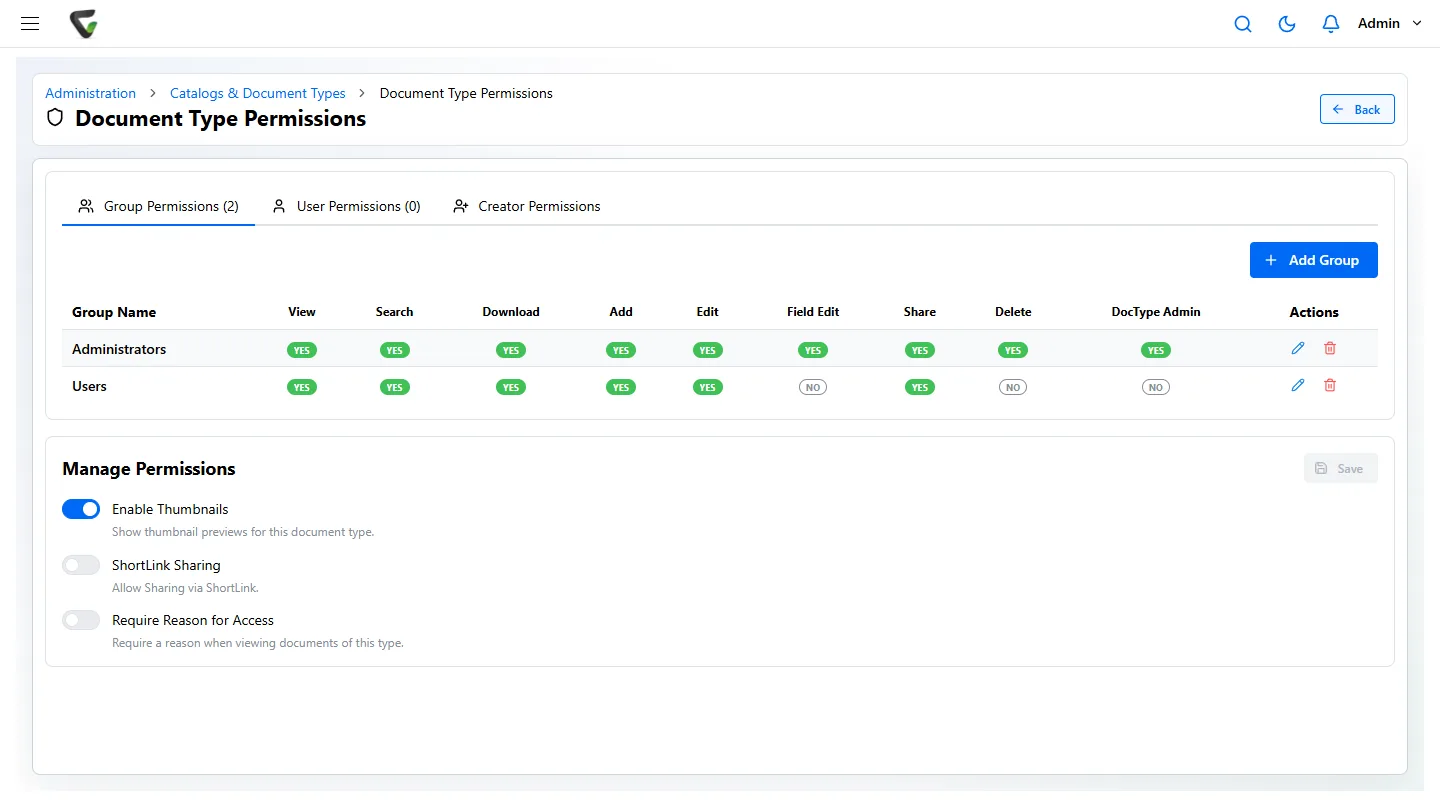
Permissions per group and document type (view, search, download, add, edit, share, delete), permissions on individual fields, and access limited by a field value such as clinic location.
Document Type Permissions
Audit controls and activity review
§164.312(b), §164.308(a)(1)(ii)(D)
The Event Viewer logs sign-ins with IP address, searches with their text, views, downloads, changes, deletions and emails with recipients. Filter by user, action and dates. Leave Purge Days empty and events are kept indefinitely.
Event Viewer
Integrity
§164.312(c)(1)
A new version for every file change and a minor version for field edits, approvals and signatures. Check-out locks a document while someone edits it.
Version History
Person or entity authentication
§164.312(d)
Authenticator-app codes with one-time recovery codes, which an administrator can require for every user. Password rules with lockout.
Preferences and Administration
Transmission security
§164.312(e)(1)
Content Central is served over HTTPS. Documents sent by email can go as password-protected, AES-encrypted ZIP files, and you can require that for every attachment.
Administration
Keeping documentation six years
§164.316(b)(2), §164.530(j)
A retention schedule per document type, a page showing time left on each document, and Retain Indefinitely for anything on legal hold.
Retention Policies
Right of access
§164.524
Everything filed for one patient comes back from one search by MRN or name, across scanned and electronic documents.
Search
Business associate agreement
§164.502(e), §164.504(e)
We sign HIPAA Business Associate Agreements.
Four questions you will be asked, and where the answer is.
- Who can open this record?
- Open the document type’s permissions. Each group’s rights are listed in one row: view, search, download, add, edit, share, delete. For the most sensitive types, switch on Require Reason for Access, and staff must say why before the document opens.
- Who opened it, and when?
- Open the document’s Version History for its own timeline, or filter the Event Viewer by user, action and dates. A paper chart can never answer this. Here the answer comes from the record itself, not from anyone’s memory.
- How long do we keep it?
- Each document type carries its schedule, and the Retention Policies page lists what is due for removal. Medical record retention is set by your state; HIPAA’s six years applies to required documentation such as policies and signed authorizations.
- Will the vendor sign a BAA?
- Yes. We sign HIPAA Business Associate Agreements. Content Central runs in the cloud or on your own servers, and CapturePoint 6 reads scanned pages on your own PC rather than sending them out to be read.
Straight talk
Software gives you controls. HIPAA asks for a program.
No software can meet HIPAA for you, and you should be wary of any vendor that says it does. Content Central gives you the access, audit and retention controls and the records to prove they are used. These stay with your practice:
- Your risk analysis and risk management plan
- Written policies and procedures, and who enforces them
- Workforce training and sanctions
- If you run it on your own servers: their encryption, backups and contingency plan
- Physical safeguards for the file room, and the server room if you run it on-premises
- Business associate agreements with your other vendors
Bring your checklist. We will open every screen on it.
In a free demo we set permissions on a patient document type, require a reason to open it, sign in with MFA, and read the Event Viewer back to you. Ask for our Business Associate Agreement at the same time.
Fortune 500 companies and government agencies review Ademero's security every year. More than 1,000 organizations have used Ademero software since 2002.