Skip to content

Content Central · mortgage lending

Every loan file knows what it is still missing.

Content Central gathers every document that carries a loan number into that loan's packet, checks it against the document types each stage requires, and tells processing, closing and post-closing which loans are complete.

One loan number, three stage checklistsLoan number 26-04187 is the key field for three packet templates. Submit to underwriting, kept by the processor, is incomplete: the loan application, pay statement, wage and tax statement, account statement and appraisal report are found, and the verification of employment is missing. Clear to close, kept by the closer, is incomplete: the loan estimate and appraisal report are found, and the title commitment and insurance binder are missing. Ship to investor, kept by post-closing, is incomplete with four documents still to come after closing: only the loan application is found so far. The loan application and appraisal report each count in two checklists.Key fieldLoan Number 26-04187Submit to underwritingPacket template · ProcessorIncomplete · 1 missingLoan ApplicationPay StatementWage and Tax StatementVerification of EmploymentAccount StatementAppraisal ReportClear to closePacket template · CloserIncomplete · 2 missingLoan EstimateAppraisal ReportTitle commitmentInsurance binderShip to investorPacket template · Post-closingIncomplete · 4 missingLoan ApplicationClosing DisclosureNoteRecorded deed of trustFinal title policyCounts in more than one checklist. Filed once.
One loan number, three packet templates. Each document is filed once and counts wherever it is required. Example loan.

Three desks, three checklists

Each desk asks a different question of the same loan.

A packet template is a list of document types, each marked required or optional, tied together by one key field: the loan number. Make one template per stage. A document joins every template that lists its type, the moment it is filed with the loan number, and a new template picks up the documents already on file.

Processor

“What do I still need from this borrower?”

Pay stubs, W-2s, bank statements and the verification of employment arrive by email, upload and the branch scanner. The packet shows the file as Complete, or Incomplete with the missing document types named.

Submit to underwriting

Closer

“Is anything holding up the closing date?”

Title commitment, insurance binder and the Loan Estimate on file. A scheduled rule can email you about every loan whose closing checklist is still incomplete.

Clear to close

Post-closing and shipping

“Which files are still waiting on trailing documents?”

The recorded deed of trust and the final title policy come back weeks after closing. A scheduled report lists every loan still incomplete, so nothing ships short.

Ship to investor

What goes wrong today

Loan files rarely fail on the big documents. They fail on the one that went somewhere else.

  • The VOE that landed in one inbox.

    The employer returns the verification of employment to the processor who requested it. She is out on Friday, and underwriting sends the file back as incomplete.

  • The trailing document nobody chased.

    The loan closed and shipped. The recorded deed of trust came back from the county two months later and went in a tray. The investor asks for it.

  • The checklist that lived in a spreadsheet.

    Each processor keeps a stare-and-compare list in Excel. It is right on the day it is updated, and nobody else can see it.

Getting the loan number onto every page

A packet is only as good as the loan number on each document.

Lender documents carry it already.

The application, the Loan Estimate and the Closing Disclosure print the loan number. CapturePoint 6, at the branch scanner, splits a mixed stack, recognizes each document and reads its fields on that PC, then sends each one to Content Central with its values matched to your fields.

Borrower documents never do.

Pay stubs, W-2s and bank statements know nothing about your loan. Scan a borrower's stack in Content Central behind a packet separator sheet and type the loan number once; every document in the stack carries it. Anything that arrives without one waits in the Coding Queue until someone types it.

Email brings it in the subject line.

Content Central can watch a processing mailbox on Microsoft 365, Gmail or IMAP, file the attachments, and read the loan number out of the subject with a pattern you set.

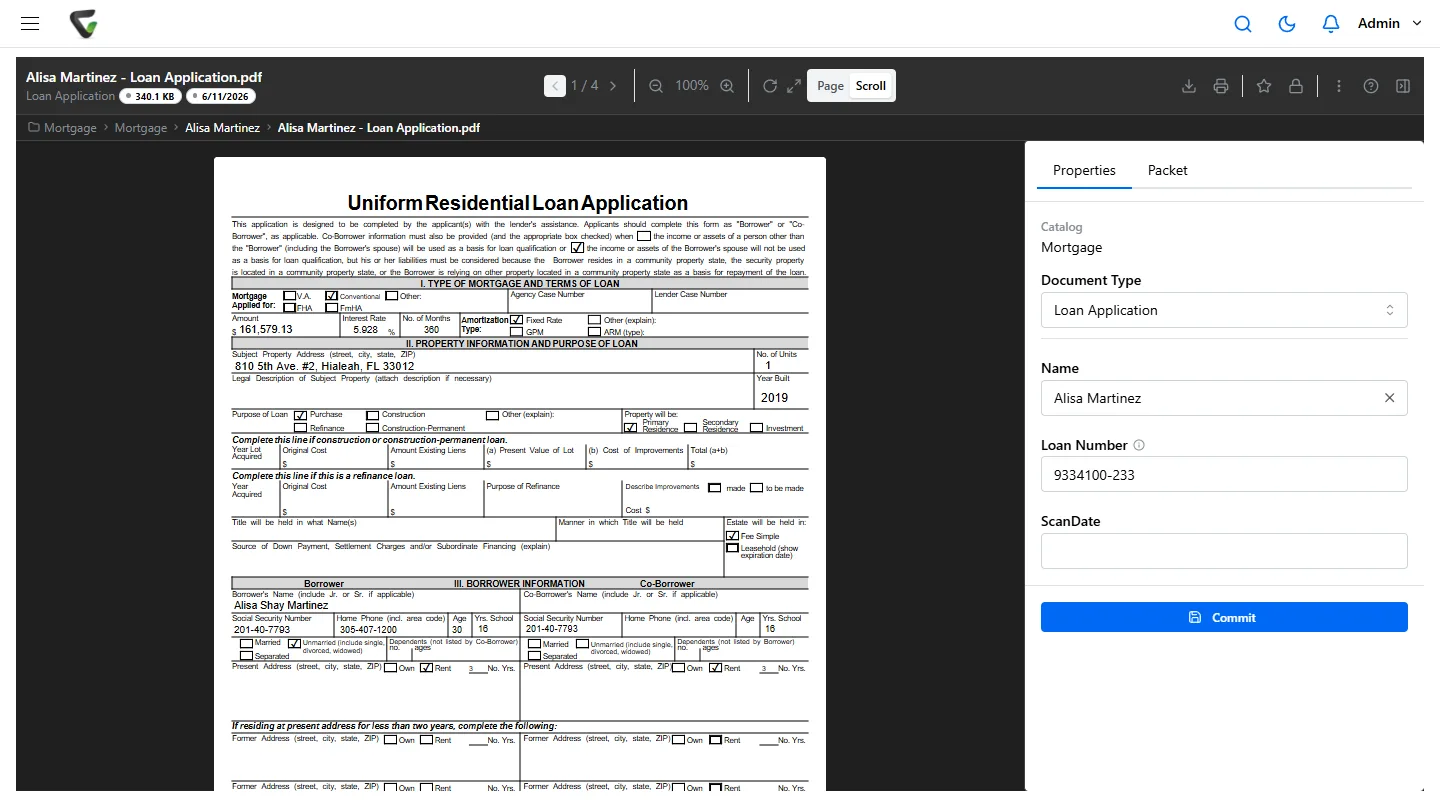
A loan application open in Content Central, filed in the Mortgage catalog with the borrower name and loan number as index fields, and a Packet tab beside Properties
A loan application filed with its loan number. The Packet tab beside Properties shows the loan's checklist. Example data.

A CapturePoint 6 mortgage job, for example

Document types a loan job can sort, and the fields it reads from each.

Loan Application
Loan number, borrower name, lender
Loan Estimate
Lender, borrower, loan ID, interest rate, estimated closing costs, estimated cash to close
Closing Disclosure
Lender, borrower, loan ID, cash to close, interest rate
Pay Statement
Employee, employer, pay date, gross pay, net pay
Wage and Tax Statement
Employee name, employer name, tax year, wages, federal income tax withheld
Verification of Employment
Employer name, requesting organization
Account Statement
Statement issuer, account holder, closing balance
Appraisal Report
Parcel number, client

Point it at a folder of your own loan documents and it works out the document types and fields by itself, then learns from every correction. The free trial starts the first time you open it, with a 2-minute tour on sample documents.

A worked example

Loan 26-04187, from the application to the investor file.

  1. Day 1

    Processor

    The signed application and the Loan Estimate are scanned at the branch. CapturePoint 6 recognizes both and reads the loan number, so they join loan 26-04187 on their own. Three checklists now exist for the loan, and all three say Incomplete.

  2. Days 2 to 6

    Processor

    The borrower emails pay stubs and bank statements to the processing mailbox with the loan number in the subject. Content Central reads the number from the subject line and files each attachment to the loan. The W-2s come in on paper, scanned behind a packet sheet with the loan number typed once.

  3. Day 7

    Workflow

    A scheduled rule finds the underwriting checklist still incomplete after five days and emails the processor. The packet shows why: the verification of employment.

  4. Day 9

    Underwriting

    The VOE arrives and the checklist turns Complete. That fires a rule that starts the underwriting approval on the whole packet: the underwriter sees every document, approves with a PIN, and the decision is in the audit trail.

  5. Day 12

    Processor

    One condition: a letter of explanation for a large deposit. It goes to the borrower as a signature request by email. When she signs, the signed PDF is saved as a new version and, carrying the loan number, sits in the file.

  6. Day 31

    Post-closing

    Closed. The Closing Disclosure and the note are scanned; the shipping checklist is waiting only on the recorded deed of trust and the final title policy. Every Monday the Incomplete Packets report lists this loan with the others still waiting.

  7. Day 64

    Post-closing

    The recorded deed of trust comes back from the county and the file turns Complete. The packet is merged into one PDF and exported to the folder your delivery process picks up from.

Signatures are requested per document; a packet is not signed in one session. Your loan origination system stays your system of record for the loan itself; Content Central keeps the documents.

The rules behind the file

Each document in the file runs on its own clock.

Federal minimums for a few of the records in a consumer mortgage file. Investors, servicing agreements and state rules often ask for longer; set each document type's schedule to the period your counsel approves.

ECOA / Regulation B

Application records

Generally 25 months after you notify the applicant of action taken

TILA / Regulation Z

Evidence of Loan Estimate compliance

Three years after consummation

TILA / Regulation Z

The Closing Disclosure and related documents

Five years after consummation

Your investors and your state

Everything else in the file

The period you set, per document type, with a hold that overrides it

The GLBA Safeguards Rule

For non-bank lenders and brokers, the FTC's Safeguards Rule asks for access controls, multi-factor authentication for anyone reaching customer information, and a record of what authorized users do. Banks and credit unions follow their regulators' guidelines to the same end. Content Central runs in the cloud or on your own servers and gives you the controls; your information security program decides how they are used.

  • Permissions by document type, and down to field values, so a branch sees only its own loans
  • A reason required before anyone opens a document type you mark sensitive, kept in its history
  • Authenticator-app sign-in codes you can require for everyone, with Active Directory or SAML single sign-on
  • An audit trail of sign-ins, searches, views, downloads, changes and emails
  • Documents emailed as password-protected ZIP files
  • Retention per document type, and any loan kept indefinitely when it is on legal hold or under a repurchase demand

Bring your stacking order. We will build the checklists while you watch.

In a free live demo we set up a loan number field, your underwriting and shipping checklists, and file a sample loan into them so you can see Complete and Incomplete on your own document types.

Since 2002, more than 1,000 organizations have used Ademero software. Fortune 500 companies and government agencies review our security every year.