Healthcare · practices, clinics and billing offices
Every EOB, denial and referral, on the right patient account before the first appointment.
The fax line, the payer mail and the front desk all feed one billing office. CapturePoint 6 splits the stack, works out what each page is and reads the account number. Content Central keeps it private and searchable, in the cloud or on your own servers.
We sign HIPAA Business Associate Agreements.
Who this page is for
Three desks, one stack of paper.
Practice administrator
You answer for the audit, the budget and the staff who lose their mornings to the scanner. You want paper handled once, by the right person, with a record you can show anyone who asks.
Billing and revenue cycle manager
Your day starts with remits, EOBs and denials, and ends with whichever appeals beat the payer’s deadline. Every hour your team spends sorting paper is an hour not spent working claims.
Front desk and medical records
Insurance cards, intake packets, referrals and records requests, each tied to the right patient before the next one walks in. When a patient asks for a copy of their records, you are the one who has to find it all.
What goes wrong today
The denial that was really a missing page.
A denial like this has nothing to do with medicine. It is paper: the right page existed, in the wrong place. The same thing happens with the ABN signed at check-in that nobody can find when Medicare denies the claim, and the patient's records request that waits in a fax tray while the clock runs.
The fix is not more filing. It is paper that files itself to the patient account the moment it arrives, so the next person finds it with one search.
Day 1
The payer faxes a prior authorization approval for a patient’s MRI.
Day 1
It is printed and filed under the referring physician, not the patient.
Day 9
The MRI is done. The claim goes out.
Day 31
An adverse benefit determination arrives: no authorization on file.
Day 32
Two people spend a morning in cabinets and fax logs. The approval turns up.
Day 33
The appeal goes out, close to the payer’s deadline.
Your paperwork, by name
Fourteen kinds of payer and patient paper, and what it reads.
- Explanation of Benefits
- From: Payer, by mail or fax
- Statement reference and date, member ID, member, plan, patient responsibility
- Payment posting
- Provider remittance advice
- From: Payer
- Payer, payment reference and date, payee and NPI, payment amount
- Payment posting and reconciliation
- Adverse benefit determination
- From: Payer
- Payer, decision date, claim number, patient, member ID
- Appeals queue, same day
- Claim reconsideration and appeal
- From: Your team or the patient
- Patient, claim number, disputed amount, appeal reason, appellant, payer, appeal date
- Filed with the denial it answers
- Prior authorization determination
- From: Payer, usually by fax
- Reference number, member ID
- The patient account, before the visit
- Specialist referral authorization
- From: Referring practice
- Referral number, date, patient, referring provider, referred to, reason
- Scheduling and the patient account
- Eligibility and benefits verification
- From: Payer portal printout
- Transaction ID, inquiry date, patient, member ID, plan, coverage status, payer
- The visit it was checked for
- Health insurance claim
- From: Your billing system, printed
- Insured, patient, date of birth, account number, payer, billing provider and NPI, total charges
- The patient account
- Encounter form or superbill
- From: Providers, after the visit
- Account number, patient, service date, rendering provider, total charges
- Charge entry
- Advance Beneficiary Notice
- From: Front desk, signed by the patient
- Notifier, the option the patient chose, signature date, beneficiary
- Kept with the visit for Medicare
- Coordination of benefits questionnaire
- From: Payer, completed by the patient
- Questionnaire reference, member ID, patient, other coverage, requesting payer
- The patient account
- Insurance ID card
- From: Front desk scanner
- Member name and ID, group number, payer ID, effective date, plan, Rx BIN
- Registration
- Patient statement
- From: Your billing system
- Billing provider, statement date, account number, due date, patient, guarantor
- The patient account
- Fax cover sheet
- From: Anyone who faxes
- Request ID, request date, patient
- Recognized as a cover, never page one of a document
Field by field, with a worked EOB example: the EOB and medical claims capture guide.
Already receive 835 electronic remittances? An 835 is already data, so post it directly. Capture is for the rest of the mail: EOBs from plans that do not send electronic remits, denial letters, appeal decisions, authorizations and correspondence.
Handwritten forms? Printed and typed forms are read automatically. Plan for handwritten entries to go to a person on the review screen, where one keystroke confirms the document.
A day with Ademero
A Tuesday in the billing office.
7:30
Billing
The overnight faxes and the payer mail go through as one stack.
A batch separator sheet marks where each pile starts. CapturePoint 6 splits the stack into documents, recognizes each one as an EOB, a remittance, a denial, a referral or a cover sheet, and reads the account number, payer and dates. Faxes saved as PDF or TIFF files are imported the same way.
8:10
Billing
Only the doubtful pages wait for a person.
Each waiting document says why in plain words, for example an account number that does not match your patient list. One person checks the page beside its fields and confirms it. CapturePoint 6 learns from every confirmation, so after steady use most documents go straight through.
8:30
Everyone
Every document is on the patient account, named and searchable.
Finished documents go to Content Central with their values as index fields. A workflow rule sends every adverse benefit determination to the appeals work queue the moment it is filed, and reminds the queue if one sits longer than you allow.
11:15
Billing
A payer calls about a claim.
Search by account number, claim number, member ID or any word printed on the EOB. The page opens with the words you searched for highlighted.
2:00
Front desk
A new patient arrives with a clipboard and a card.
The intake packet and the insurance card are scanned at the desk and filed under the patient. Next time, send the intake form ahead of the visit: a fillable form emailed to the patient files itself, with its data, when they submit it.
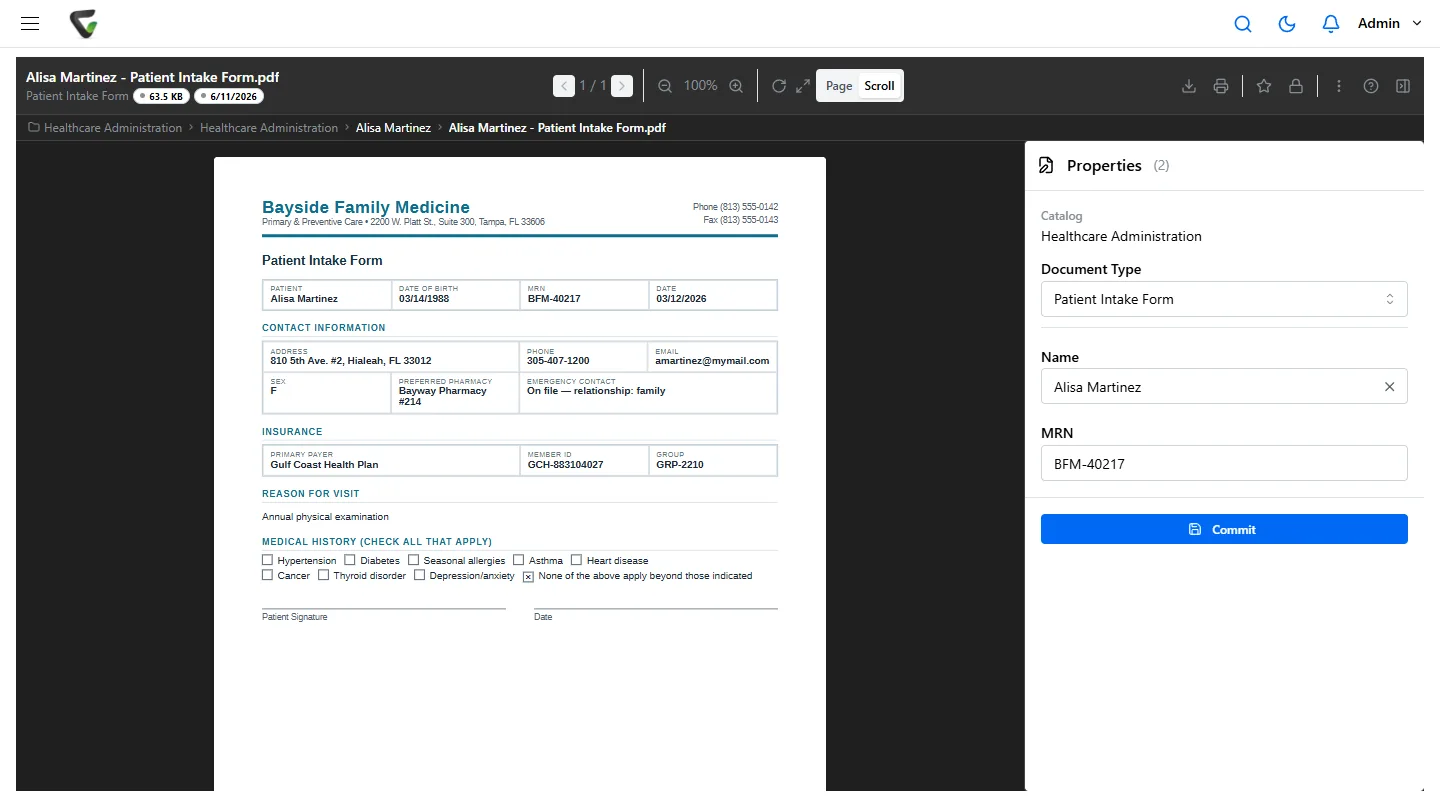
An intake form filed under the patient, by name and MRN. Example data. 4:30
Administrator
The privacy officer asks who opened a chart.
The audit trail lists every view, download, search, change and email, by user and time. On the most sensitive document types, staff must type a reason before a record opens, and the reason is kept in its history.
The rules you work under
What the rules ask of your paper, and what helps.
Rule
What it asks of your paper
How Ademero helps
HIPAA Privacy Rule: minimum necessary
Each person on your staff sees only the patient information their job needs.
Permissions by document type and down to individual fields, and row-level access by field value, so one clinic location sees only its own patients.
HIPAA Security Rule: access and audit controls
Unique sign-ins, controls on who can reach electronic protected health information, and a record of activity in the systems that hold it.
Active Directory or SAML single sign-on, authenticator-app MFA you can require for everyone, and an audit trail of sign-ins, views, downloads and changes.
HIPAA right of access
Patients can ask for copies of their records, generally answered within 30 days. Some states set shorter deadlines.
Everything for one patient is found with one search across scanned and electronic documents, so a request is gathered without a trip to the file room.
Retention: HIPAA documentation and state medical records law
HIPAA requires certain documentation, such as signed authorizations and your privacy policies, to be kept for six years. How long the medical record itself is kept is set by your state.
A retention schedule per document type, a page that shows time remaining, and per-document overrides, including keeping a record indefinitely when it is on legal hold.
Medicare Advance Beneficiary Notice (ABN)
When you expect Medicare may not pay, the patient signs the ABN before the service, and you keep a copy.
CapturePoint 6 reads the option the patient chose and the signature date, and files the ABN with the visit, where billing can find it when the claim comes back.
Payer appeal and timely filing limits
Each payer sets its own deadlines for appeals and corrected claims, and they do not move.
Denials reach the appeals queue the day they arrive, with a reminder rule if one waits, instead of sitting in a fax tray.
What you would use
Two products, one for each end of the paper.
At the scanner
CapturePoint 6
A Windows app beside your scanner. It reads every page on that PC, so patient pages are not sent to an outside service to be read. Unlimited scanning.
- Splits mixed stacks and recognizes each document type
- Reads account numbers, member IDs, payers, dates and amounts
- Checks values against your own lists, such as a patient list
- Sends finished PDFs and their data to Content Central, folders, SharePoint or OneDrive (work or school accounts), Google Drive, Dropbox or Nucleus One
Where records live
Content Central
Document management used in a web browser, in the cloud or on your own servers, your choice. On your own servers, patient records stay in your environment. It works beside your EHR, not instead of it: the EHR keeps the clinical chart, and Content Central keeps the paperwork around it, filed under the same account number or MRN your staff already search by.
- Full-text search across scanned and electronic records
- Workflow rules and work queues for denials, referrals and requests
- Permissions by document type and field, plus a reason required to open sensitive records
- Audit trail, version history and retention schedules with legal holds
By setting
Go deeper for your part of healthcare.
Scan this morning's payer mail this afternoon.
Download CapturePoint 6, take the 2-minute tour from the welcome screen, then try it on a few of your own EOBs and remits. The free trial starts the first time you open it, with no form. Every page is read on your own PC.
Why practices trust us with patient records
- We sign HIPAA Business Associate Agreements.
- Content Central runs in the cloud or on your own servers; CapturePoint 6 reads on your own PC.
- Fortune 500 companies and government agencies review Ademero's security every year and keep renewing.
- More than 1,000 organizations have used Ademero software since 2002.