Hospitals · health information management
Release of information without the trip to the file room.
For HIM directors and release of information specialists. Outside records, signed authorizations and the charts from before your EHR, filed to one patient by MRN, in the cloud or on your own servers, with each department seeing only the part it needs.
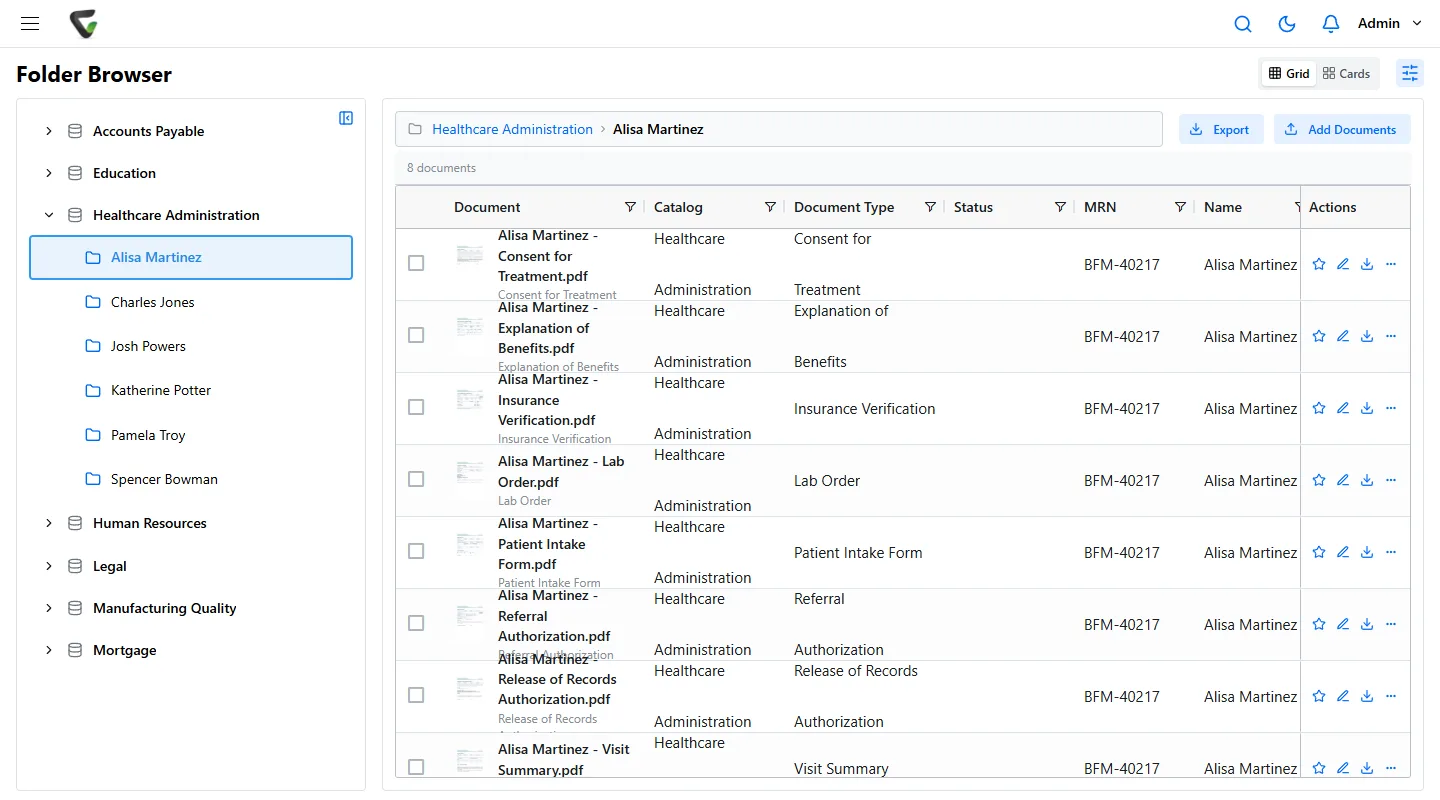
The record is bigger than the EHR.
Your EHR holds the clinical notes. HIM still answers for everything around them, and a records request covers all of it. Content Central does not replace your EHR. It keeps this paper in order beside it.
- Charts from before the EHR
- Paper charts in the file room and in off-site boxes, still inside their retention period and still requested.
- Outside records
- Records from other hospitals, practices and labs that arrive on paper or as files, and have to be matched to your patient and MRN.
- Signed consents and authorizations
- Consent for treatment, release of records authorizations and the requests that came with them.
- Department paperwork
- Lab orders, visit summaries, insurance verification and the forms each department keeps for its own work.
Release of information
One request, from the counter to the disclosure record.
Requests come from patients, attorneys, insurers and other providers. Each one starts a clock, and each one needs the right authorization before anything leaves.
The patient's clock
Under the HIPAA right of access, a patient's request is answered within 30 days, with one 30-day extension if you tell them why in writing. Some states set shorter deadlines.
The disclosure record
Patients can ask for an accounting of certain disclosures from the past six years. The audit trail keeps every document emailed, with its recipients and the date, which gives you the facts to build it from.
The requests themselves
Requests that arrive by email can be captured from a Microsoft 365, Gmail or IMAP mailbox, so the request is filed with the patient alongside what you sent.
Every department in one system. Each sees only its part.
HIPAA's minimum necessary standard asks that staff see only what their job needs. In Content Central you set that per group and per document type. Here is one way a hospital might set it up.
HIM and release of information
- ConsentsOpen and add
- Release authorizationsOpen and add
- Lab ordersOpen and add
- Behavioral health recordsOpen and add
- EOBs and statementsView only
Patient financial services
- ConsentsView only
- Release authorizationsNot visible
- Lab ordersNot visible
- Behavioral health recordsNot visible
- EOBs and statementsOpen and add
Laboratory
- ConsentsView only
- Release authorizationsNot visible
- Lab ordersOpen and add
- Behavioral health recordsNot visible
- EOBs and statementsNot visible
Behavioral health
- ConsentsView only
- Release authorizationsView only
- Lab ordersView only
- Behavioral health recordsOpen and add
- EOBs and statementsNot visible
More than one campus
Limit access by a field value such as Facility, so staff at the north campus see north campus patients and nobody else's.
A reason before it opens
Turn on Require Reason for Access for the most sensitive types. Records covered by 42 CFR Part 2, for substance use disorder treatment, are a common choice. The reason is kept in the document's history.
Signed in the way you already sign in
Active Directory or SAML single sign-on, with authenticator-app codes you can require for everyone. The full HIPAA control map.
Emptying the chart room, one site at a time.
Start with one backlog, such as the charts still inside their retention period, or one daily flow, such as outside records. There are two ways to scan, and you can use either or both.
Type the MRN once
Scan in Content Central
Scan from the browser with DirectScan. For a chart, put a printed QCard separator between documents and type the MRN once: every document in the stack carries it and joins the patient. Good for the steady flow at a department desk.
Let it read the pages
Scan with CapturePoint 6
For mixed charts and outside records, point CapturePoint 6 at a folder of sample pages and it works out the document types and fields itself. It splits each chart into documents and reads the patient name, date of birth and MRN on the scanning PC, then sends each one to Content Central with its fields.
Each document type carries its own retention schedule, set from your state's medical records rules and your policy. A Retention Policies page shows the time left on each document, and a record under legal hold is kept indefinitely until you release it.
Bring a real request. We will walk it through live.
In a free demo we set up a patient, file an authorization and outside records against it, gather them by MRN, send them, and open the audit trail that shows it happened.
- We sign HIPAA Business Associate Agreements.
- Content Central runs in the cloud or on your own servers, your choice. On your own servers, patient records stay in your environment.
- Fortune 500 companies and government agencies review Ademero's security every year.