Free tool · Accounts payable
Invoice processing cost calculator
Your numbers
The values filled in are examples to replace with your own. They are not industry benchmarks.
Today, by hand
Open it, key the fields and line items, check it, file it.
Wage plus benefits and payroll taxes.
With CapturePoint 6 or Paige
The software reads every invoice. A person only checks the ones it sends to review. Every review teaches it, so that share is higher on a brand-new job and keeps falling with use.
Try a higher number to see a brand-new job.
Set the same as by hand to be cautious. The values are already filled in, so it is usually quicker.
Your estimate
Today, by hand
133 hours, $4,667
a month; $4.67 per invoice
With CapturePoint 6 or Paige
2.7 hours, $93
a month; $0.09 per invoice
The difference
50× less staff time
131 hours and $4,573 a month; 1,568 hours and $54,880 a year
Not counted on either side: approving invoices and settling vendor disputes. People make those decisions with or without automation. Worked out in your browser; nothing is stored or sent. An estimate, not a quote or a promise of savings.
Who handles your invoices
The same month of invoices, today and with automation.
Today, by hand
1,000 handled by a person
Every invoice opened, keyed, checked and filed by hand: 133 staff hours a month.
With CapturePoint 6 or Paige
20 checked by a person
The other 980 go straight through, read and filed by the software: 2.7 staff hours a month.
How to get your own numbers
The calculator rests on one idea. Today a person handles every invoice. With capture software, the software reads every invoice and a person only checks the few it is unsure of. So you need three numbers, and each one can be measured rather than guessed.
| Number | How to measure it |
|---|---|
| Minutes to handle one invoice | Over one normal week, time 20 invoices end to end, from opening to filed, from different vendors. Include the messy ones that needed a call or a correction; they are part of handling invoices by hand. |
| Invoices sent to review | Run a week of real invoices through the CapturePoint 6 free trial and count how many it sends to review. Expect that share to fall as your team confirms and corrects, because every review teaches it. |
| Minutes to check one of them | Time a few reviews on the trial. The values are already filled in beside the page, so a check is usually far quicker than typing. |
Two rules keep the numbers honest. Use the loaded cost of an hour, not the wage alone: add benefits and payroll taxes, or ask payroll for the figure they use. And time the whole job by hand, not just the typing. Printing an emailed invoice, renaming the file to match the filing rules and calling a vendor about a wrong total are all part of handling an invoice today.
What the calculator leaves out, on purpose
Approving an invoice and settling a dispute with a vendor are decisions people make, with or without automation, so the calculator counts neither side. What does change is the chasing around them. Content Central routes each invoice to the right approver, sends reminders and escalates when one waits too long, so the minutes someone spends sending PDFs and reminder emails mostly go away. That is a saving on top of the estimate above.
What each Ademero product does
The share sent to review is the number that matters most. The software reads every invoice, and your team only opens the ones it is unsure of. That share is higher while a new job is learning and keeps falling as people confirm and correct.
Open, sort and key: CapturePoint 6
CapturePoint 6 runs on a Windows PC and reads invoices from your scanner or from PDF and image files. It splits a stack into separate documents, recognizes which are invoices, and pulls header fields and line-item tables. It checks the line-item math and flags anything that does not add up, with the reason shown on the review screen, so your team checks the problem cases instead of retyping every invoice. It learns from each confirmation and correction. Reading happens locally on the PC, and finished documents go to folders with a data file of every value, to Content Central, or to SharePoint, OneDrive, Google Drive, Dropbox or Nucleus One.
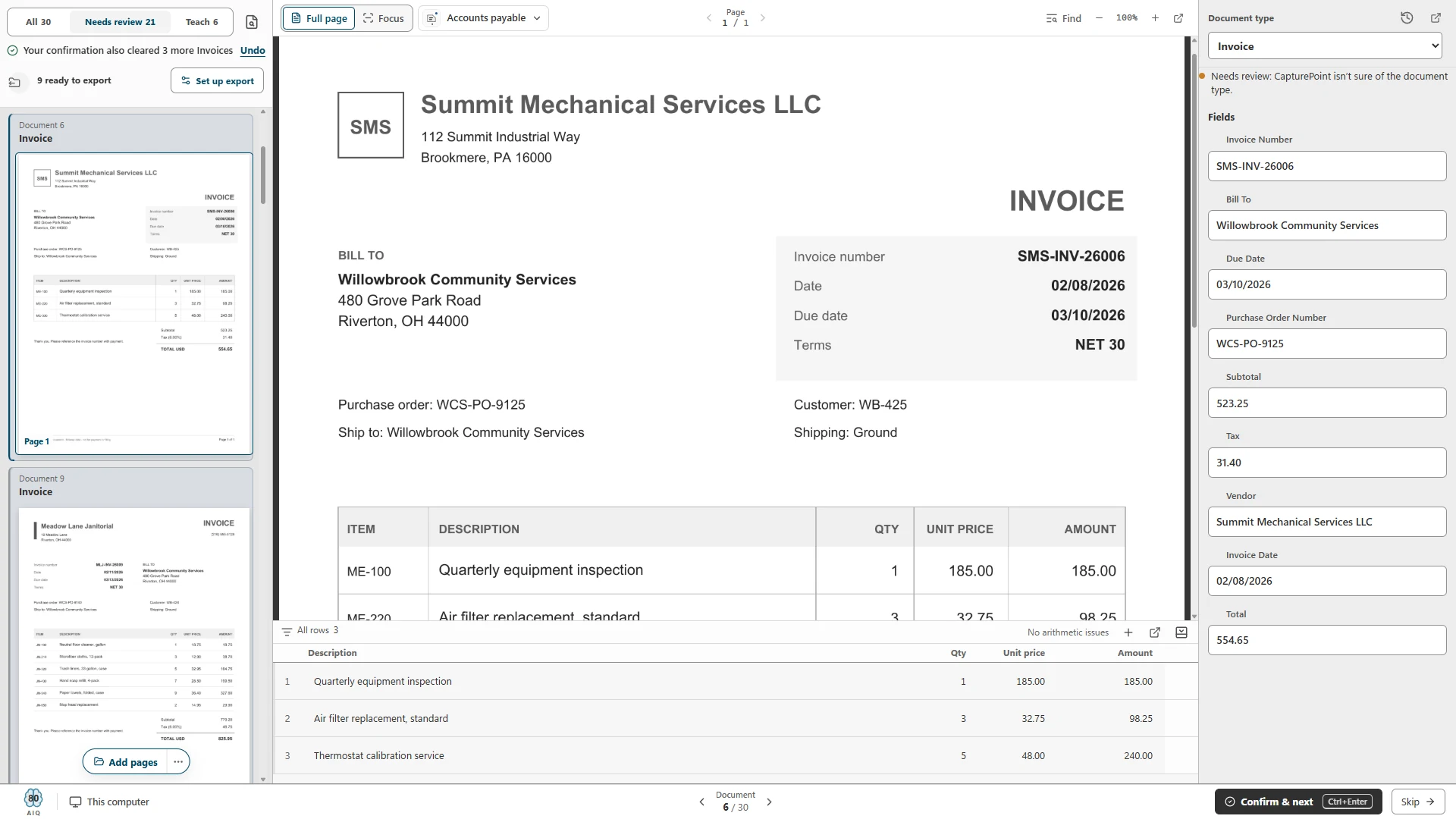
Review screen with an invoice's fields and line items beside the page, and the reason it needs review. The review minutes in your estimate are time spent here, on only the invoices sent to review.
Approvals and export to accounting: Content Central
Content Central is document management in the cloud or on your own servers. An approval can start the moment an invoice is captured, rules can send invoices over a set amount to a second approver, and approvals that wait too long can escalate. Approvers get an email with Approve and Reject links, a phone-friendly queue, and can name substitutes while they are away. Approved invoices can export to QuickBooks Online, QuickBooks Desktop, Sage 50, Sage X3, Workday or Epicor, with duplicate detection and an export status you can search on. In the help library:
Invoices that arrive as PDFs: Paige
If most invoices arrive by email and you want the data delivered into another system without a PC in the middle, Paige is our cloud service. Send it documents and get clean data back, header fields and line items included, by download, SFTP or webhook. It learns your layouts from a few samples. Read how Paige works.
Keep going
- Invoice processing with Ademero: the whole flow from intake to export.
- Invoice OCR, a practical guide: fields, line items, accuracy checks and how to evaluate a tool.
- AP document capture setup checklist: the decisions to make before the first invoice is scanned.
- CapturePoint 6 for invoices: what it reads and how the review screen works.
The most reliable way to fill in the review share is to measure it yourself. Install the CapturePoint 6 free trial, run a week of real invoices through it, and see how many it sends to review. Share the link with your controller, or print the summary for the budget file.
CapturePoint 6 free trial
Time it on your own invoices.
CapturePoint 6 reads invoices on your own PC: it splits the stack, pulls header fields and line items, checks the math and shows you only what needs a look. The free trial starts the first time you open it, with no form. Run a week of real invoices and put the new minutes in the calculator.